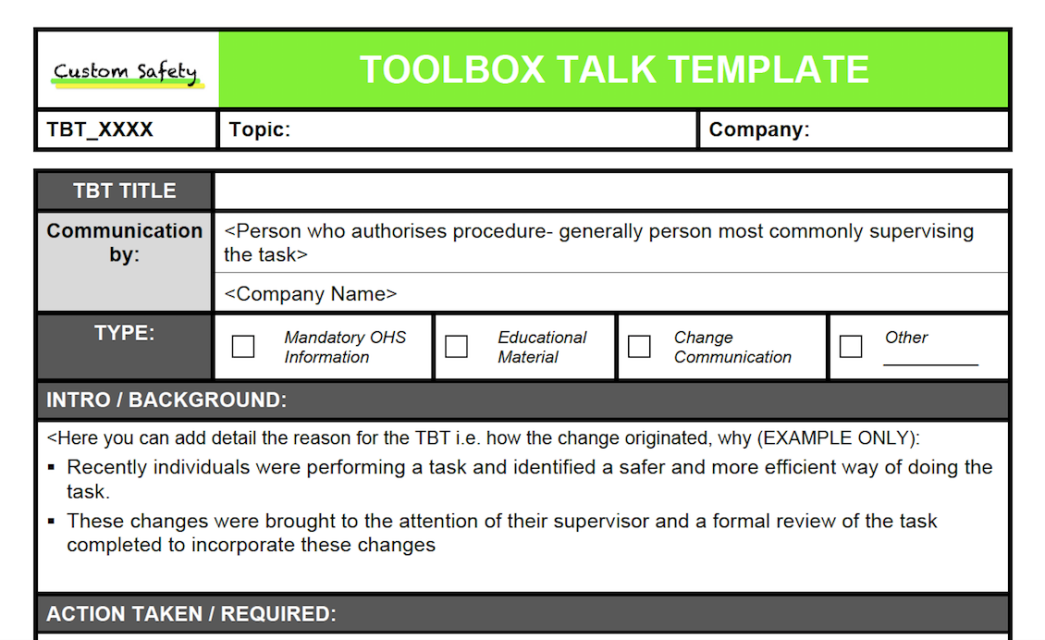
Safety doesn’t happen by accident—it’s built through routine, awareness, and consistent communication. Yet on many job sites, safety meetings feel like check-the-box exercises. The real problem? Generic, outdated, or one-size-fits-all toolbox talk formats that fail to engage crews or address site-specific risks.
An editable toolbox talk template fixes that. It’s not just a document—it’s a dynamic tool that adapts to changing conditions, crew needs, and project phases. When done right, it reduces incidents, improves accountability, and keeps safety top of mind without wasting time.
This guide breaks down how an effective editable template works, what to include, and how to implement it across teams—whether you’re managing a construction crew, utility team, or industrial maintenance group.
Why You Need an Editable Toolbox Talk Template
Toolbox talks are brief safety meetings, typically 10–15 minutes long, held at the start of a shift or before high-risk tasks. They’re designed to reinforce safe behaviors, highlight hazards, and encourage team input.
But if your talks are based on static PDFs or handwritten notes, you’re missing opportunities for consistency and improvement.
An editable template changes that. It allows you to:
- Customize content for specific tasks, equipment, or weather conditions
- Update rapidly as hazards evolve (e.g., new machinery, night shifts, confined spaces)
- Ensure compliance with OSHA, ANSI, or company safety standards
- Track participation with digital sign-offs and timestamps
- Scale across teams without rewriting from scratch
Without a reusable, editable format, safety talks become disjointed. One supervisor might skip fall protection reminders on a roof job. Another might overlook lockout/tagout procedures during equipment maintenance. An editable template prevents those gaps.
Key Components of an Effective Template
A good editable toolbox talk template isn’t just a blank document. It’s structured to prompt critical thinking while remaining flexible. Here’s what every version should include:
#### 1. Meeting Header Basic but essential: - Date and time - Location or work area - Supervisor name - Crew members present (with space for signatures or initials)
This creates accountability and helps during audits.
#### 2. Topic & Objective Clearly state the focus—e.g., “Working at Heights” or “Noise Exposure in Confined Areas.” Follow with a one-sentence goal: “Ensure all workers inspect harnesses before use.”

#### 3. Hazard Identification List 2–4 relevant hazards. Use plain language. For example: - Risk of slips on wet surfaces - Pinch points during conveyor maintenance - Electrical exposure when working near panels
Encourage workers to add their own observations here.
#### 4. Safe Work Practices Outline specific actions to mitigate risks: - Use non-slip footwear in designated zones - Maintain three-point contact on ladders - Verify lockout before servicing
These should be actionable, not theoretical.
#### 5. Equipment & PPE Requirements Name required gear: - Hard hats, safety glasses, high-vis vests - Respirators for dust-heavy areas - Insulated gloves for electrical work
Checkboxes help during pre-task inspections.
#### 6. Discussion Prompts Include 2–3 open-ended questions: - “Has anyone encountered a near-miss with this task before?” - “What would you do if a coworker bypassed a safety guard?”
This turns a lecture into a conversation.
#### 7. Sign-Off Section Digital or printed space for each worker to sign or initial. Crucial for record-keeping and legal protection.
Common Mistakes That Undermine Effectiveness
Even with a solid template, poor execution kills impact. Avoid these pitfalls:
- Reusing the same talk every week
- Workers tune out if the topic never changes. Rotate themes and tailor them to current work.
- Failing to involve the team
- A monologue isn’t a toolbox talk. Ask for input. Let someone else lead occasionally.
- Skipping documentation
- No signatures? No proof. If OSHA shows up, you can’t rely on memory.
- Using jargon or vague language
- “Ensure proper PPE utilization” sounds official—but “Wear gloves when handling steel beams” works better.
- Holding talks in noisy or crowded areas
- If people can’t hear or focus, the message is lost. Move to a quiet zone.
How to Customize Your Template for Real-World Use
An editable template is only as good as its adaptability. Here’s how to make it practical:
#### Example 1: Roofing Crew in High Winds Change the hazard section to: - Risk of being blown off slope during high winds - Falling tools striking workers below
Update PPE to include wind-rated harnesses and tool lanyards. Add a discussion prompt: “What’s the wind speed limit for working on this roof?”
#### Example 2: Electrical Maintenance in a Factory Revise safe practices: - Verify isolation with a voltage tester - Use insulated tools only - One person watches while another works
Include a photo of the correct multimeter settings in the digital version.
#### Example 3: Winter Roadwork Team Adjust for cold: - Hazards: frostbite, reduced dexterity, icy footing - PPE: thermal layers, heated gloves, slip-resistant boots - Practice: limit exposure time, buddy check every 30 minutes
These adjustments show workers you’re addressing their real conditions—not just reading a script.
Best Tools for Managing Editable Templates
You don’t need enterprise software to run effective toolbox talks. But digital tools make editing, sharing, and storing templates easier. Here are five reliable options:
| Tool | Key Feature | Best For |
|---|---|---|
| SafetyCulture (iAuditor) | Drag-and-drop template builder, real-time reporting, mobile app | Teams wanting full safety program integration |
| PunchList Pro | Cloud-based forms, photo attachments, offline access | Construction crews on remote sites |
| SiteDocs | Auto-fill fields, workflow routing, compliance tracking | Industrial and manufacturing teams |
| GoFormz | PDF-to-digital conversion, integrates with Google Workspace | Companies transitioning from paper |
| Microsoft Word + SharePoint | Free, fully editable, version control | Budget-conscious teams with basic needs |
Each offers editable templates, but differ in automation and reporting. For example, SafetyCulture sends automatic reminders before scheduled talks. PunchList Pro lets workers sign off with a fingerprint on a tablet.
The key is choosing a platform where updates flow instantly to all supervisors. If one team uses version 1.2 and another uses 1.0, confusion follows.
Making It Stick: Workflow Tips for Supervisors
A template is a starting point. Execution determines success. Follow these steps:
- Edit the night before
- Review the next day’s tasks and update the template accordingly. Add site-specific risks.
- Print or load digitally
- Distribute to crew leads. Ensure tablets or printed copies are ready.
- Start on time, end early
- Begin promptly. Stick to 10–12 minutes. Respect workers’ time.
- Encourage stories, not silence
- Ask, “Has anyone seen this go wrong?” Real experiences hit harder than rules.
- File and follow up
- Save completed talks. Review trends monthly—e.g., if “slips” come up often, add new mats or signage.
- Rotate topics monthly
- Use a 12-month calendar: January (PPE), February (ladders), March (fire safety), etc. Revisit high-risk areas quarterly.
The Bottom Line: Consistency Beats Complexity
You don’t need a 20-page document or flashy software to run great toolbox talks. You need one well-structured, editable template that evolves with your work.
Focus on clarity, relevance, and participation. Update it regularly. Make it easy to use—not another burden on already-busy supervisors.
When workers see that safety talks reflect their real world, they listen. And when they contribute, they own it.
Start with a solid editable template. Customize it. Use it consistently. That’s how you build a culture where safety isn’t scheduled—it’s expected.
Frequently Asked Questions
What should an editable toolbox talk template include? It should have sections for date, location, attendees, topic, hazards, safe practices, PPE, discussion prompts, and sign-offs.
Can I use a Word document as an editable template? Yes. Microsoft Word works well for basic needs, especially when shared via cloud storage with version control.
How often should toolbox talks be held? At least weekly, or daily for high-risk tasks. Frequency depends on project complexity and hazard level.
Are digital signatures valid on safety forms? Yes, if the system maintains audit trails and prevents editing after submission.
How do I make toolbox talks more engaging? Ask open-ended questions, involve crew members in leading, and tie topics to recent incidents or site conditions.
Should toolbox talks be the same for every crew? No. Customize content for each team’s tasks, environment, and risk exposure.
Can I download free editable templates online? Yes—OSHA, safety equipment suppliers, and industry groups often offer free, customizable versions. Always review for relevance.
FAQ
What should you look for in Editable Toolbox Talk Template for Daily Safety Success? Focus on relevance, practical value, and how well the solution matches real user intent.
Is Editable Toolbox Talk Template for Daily Safety Success suitable for beginners? That depends on the workflow, but a clear step-by-step approach usually makes it easier to start.
How do you compare options around Editable Toolbox Talk Template for Daily Safety Success? Compare features, trust signals, limitations, pricing, and ease of implementation.
What mistakes should you avoid? Avoid generic choices, weak validation, and decisions based only on marketing claims.
What is the next best step? Shortlist the most relevant options, validate them quickly, and refine from real-world results.